
| Download SmartDraft 26 |
SmartDraft Suite, Survey, and Construction Notes Free Trial Offer: Try SmartDraft and Ignite your productivity! The 30-day trial is a fully functional version of SmartDraft!! To continue using the software after the 30-day trial, purchase of a license is required. To install: Download and run the installer below. The software can be installed locally or on a network. Every workstation requires a license. Note: Current subscription clients can request a license file for SmartDraft by sending a request via e-mail: Support. SmartDraft for AutoCAD and BricsCAD (One installer for both) SmartDraft 26: Supports AutoCAD®, AutoCAD® Map 3D, AutoCAD® Civil 3D® 2022 – 2027, and BricsCAD Pro v24 – v27. SmartDraft 26.exe (103.3 MB) Version 26.2.3 released November 9, 2026 Information: The SmartDraft installation does not automatically load the cuix/cui menu. After the installation, using the CUILOAD command, browse to the smart(product).cuix (.cui for BricsCAD) in the installation folder. Warning for AutoCAD: When you load the SmartDraft menu for the first time, the File Loading – Security Concern dialog box may appear. If it does, you must select the Always Load button for SmartDraft to work correctly. Note: The listed file could be smartsuite.mnl, smartsurvey.mnl, or smartcnote.mnl. 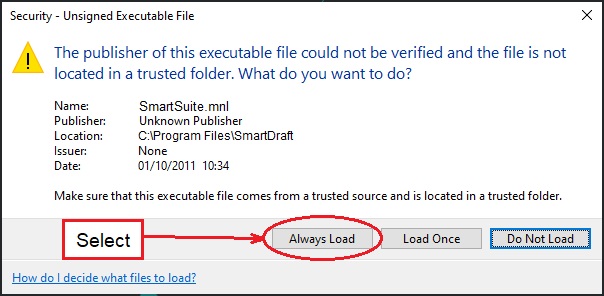 SmartDraft 26 Manual (22.1 MB .pdf) Printable manual for SmartDraft Suite SmartDraft 26 PConnect Manual (4.8 MB .pdf) Printable manual for SmartDraft PConnect SmartDraft Product Release Details Software & Hardware Requirements Command List SmartDraft Previous Releases – Just send us a Note and we’ll get it over to you: SmartDraft 21 through SmartDraft 25 (for AutoCAD 2015 to 2021) |
Shopping Cart